





Key takeaways
Dexcom will stop producing G6 sensors after July 1, 2026.
People using the Dexcom G6 will need to switch to the Dexcom G7 to continue monitoring their blood glucose.
The Dexcom G7 is smaller than the G6, has a faster warm-up time, and combines the sensor and transmitter into one device. It’s available as the standard G7 (10-day wear) or the G7 15-Day.


If you already use the Dexcom G6 continuous glucose monitor (CGM), you may already know that Dexcom will stop producing G6 sensors after July 1, 2026. The company is encouraging all users to switch to the Dexcom G7 model to prepare for the transition. It can be helpful to understand the differences between Dexcom G6 and G7 before switching. This way, users can feel confident and prepared for any adjustments they need to make to their glucose monitoring routine. Here’s what to know about the Dexcom G6 and G7, and how to talk to your healthcare provider about switching.
Dexcom G6 vs. G7: Key differences
“CGMs are recommended for patients who need real-time glucose trends, including those with type 1 diabetes, insulin-treated type 2 diabetes, frequent hypoglycemia, or hypoglycemia unawareness,” explains Eve Elizabeth Pennie, MD, physician and epidemiologist at Drugwatch. “They help track patterns, guide treatment decisions, and improve overall glycemic control,” she says.
The G6 and G7 are both CGMs made by Dexcom. The G7 has updated hardware, sensors, and software compared to the G6. Dexcom also offers a G7 15 Day version, which has a 15-day wear time compared to the standard G7’s 10-day lifespan. Read on for more on these key differences.
Warm-up time
One of the biggest differences between the G6 and G7 is the warm-up time, which is the time between inserting a sensor and getting a reading. The G6 model requires two hours to warm up, while the G7 can produce a reading in as little as 30 minutes. A shorter warm-up time means less time without glucose data between sensor changes, which can matter for those who need to monitor their glucose closely. For G6 users, that wait can feel like “2 hours of staring at nothing,” says Kiara DeWitt, registered nurse (RN) and CEO at InjectCo in Dallas, Texas.
Accuracy and performance
The accuracy of a CGM is measured in mean absolute relative difference, or MARD. A lower MARD means that the sensor’s readings are closer to laboratory blood glucose numbers. Location of the sensor, as well as the device generation, can make a difference. In one Dexcom study comparing the G5, G6, and G7 systems, G7 sensors placed on the upper arm had a lower MARD than older models. The upper arm-placed G7 had a MARD of 8.2%, compared to 9.1% for abdomen-placed G7, 9.9% for abdomen-placed G6, and 9.0% for abdomen-placed G5.
App and alerts
“CGMs connect to smartphone apps that display real-time readings, trend arrows, and alerts for high or low glucose. Apps can also share data with caregivers or clinicians, so patients should understand how to interpret trends rather than focusing on single values,” Dr. Pennie says.
The Dexcom G7 has a new mobile app that’s separate from the G6 app and isn’t backwards compatible. Both apps work with Dexcom Clarity, which analyzes your glucose readings to generate trends and reports to help you and your healthcare provider manage your blood glucose levels.
The newer Dexcom G7 model also has more advanced predictive alert features compared to the G6, including the option to delay the first high alert, and 24-hour backfilling for missed sensor readings due to connection lapses.
The alerts and settings may take some getting used to, according to DeWitt. “When you switch models, you will need to relearn the sounds of alerts and trend arrows. Each model has their own calibration nuances as well. Allow 5-7 days for your body to adjust to a new CGM,” she says.
Wear time and grace period
CGM sensors need to be replaced periodically to keep readings accurate. The time a sensor can be worn before it needs to be replaced is called the wear time, and most sensors have a grace period that lets you continue getting readings for a short time after the sensor technically expires.
Both the G6 and G7 have a 10-day wear time, but Dexcom also offers the G7 15-Day, which extends wear time to 15 days. The Dexcom G7 has a 12-hour grace period, while the G6 does not have one.
Size
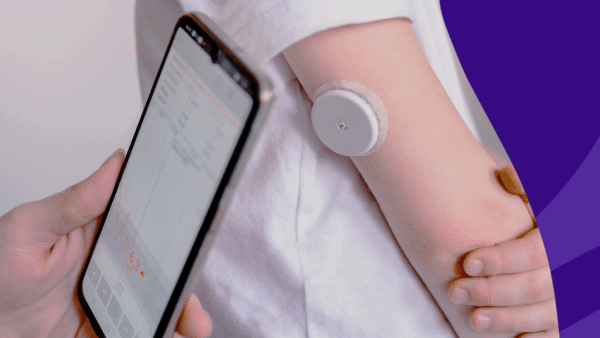
One of the most noticeable differences between the Dexcom G6 and G7 models might be the size. According to the manufacturer, the G7 is 60% smaller than the G6, about the size of three stacked quarters. The G7 also combines the sensor and transmitter into a single unit, while the G6 uses separate sensor and transmitter components.
Dexcom G6 vs. G7 comparison chart |
||
|---|---|---|
| Feature | Dexcom G6 | Dexcom G7 |
| Warm-up time | 2 hours | 30 minutes |
| Sensor design | Separate sensor and transmitter components | All-in-one sensor and transmitter |
| Wear duration | 10 days | 10 (15 days with G7 15 Day version) |
| Grace Period | None | 12 hours |
| Size | W: 1.2″ x L: 1.8″ | W: 1.07″ x L: 0.94″ |
Benefits of switching to Dexcom G7
Compared to the G6, the Dexcom G7 is smaller, has a faster warm-up time, and has the option for a longer wear period with the G7 15 Day. The smaller size makes the G7 more discreet under clothing and more comfortable for users to wear. In addition, the Dexcom G7 is FDA-approved for use during pregnancy, while the G6 is not.
The G6 has separate sensor and transmitter components that need to be connected for the device to work, but the G7 combines the two, which can make it easier for users to insert new sensors.
Finally, those who appreciate more control over their CGM alerts may prefer the G7’s app. It can create day/night alert profiles, delay the first high alert (helpful for after-meal glucose spikes), and switch to vibrate-only mode for up to six hours.
These upgrades are part of a broader advancement in CGM technology. “CGM technology is actually advancing rapidly,” DeWitt says. “The options we have today may seem primitive in two to three years when the next generation models are released.”
Potential drawbacks of switching from Dexcom G6 to G7
There are a few practical points to consider before switching from the Dexcom G6 to the G7. If you use an automated insulin delivery (AID) system, the G6 and G7 are compatible with different pumps, so switching sensors may affect which pump you can use. It’s best to check Dexcom’s pump partnerships and contact your healthcare provider or Dexcom Support before making the switch.
The G6 and G7 apps are also compatible with different mobile devices, so it’s worth checking whether your phone supports the G7 app before making the switch.
Though coverage is generally the same for both Dexcom G6 and G7 models, it might not always be automatic. Some insurance plans may require documentation or purchase from an authorized provider, which can add some time to the process. In the case of Medicare coverage, patients will have to get the device from a Medicare-authorized distributor.
How to switch from Dexcom G6 to G7
Switching from the Dexcom G6 to the G7 can include the following steps:
- Check device and pump compatibility: If you use an AID system or connected pump, confirm G7 compatibility with Dexcom before making any changes.
- Talk to your healthcare provider: Your provider can help you determine whether the G7 or G7 15 Day is the best fit based on your lifestyle, age, and condition.
- Get a new prescription: The G7 requires a new pharmacy prescription for anyone switching from G6 to G7.
- Confirm your insurance coverage: Contact your insurance provider to verify coverage before placing your order, in case you need prior authorization or other documentation for approval. If you don’t have insurance coverage, you can use a SingleCare coupon to reduce the cost of a G7 sensor.
- Order your G7 supplies: Reach out to your pharmacy or distributor to order your Dexcom G7 sensor and accessories.
- Update or upgrade your G6 receiver (if eligible): If you have a G6 receiver, you might be able to upgrade it to a G7-compatible receiver from the Dexcom Clarity website.
- Download and install the Dexcom G7 app.
- Apply your first G7 sensor and follow the G7 app’s instructions to pair with your smartphone and configure your alert preferences.
How much does Dexcom G7 cost?
The average cost for a three-pack of G7 sensors (three sensors with a 10-day wear time, a 30-day supply) is $579 without insurance. In comparison, the average cost for a three-pack of G6 sensors is $560 without insurance, though you’ll also need to factor in $366 every 90 days for the additional transmitter component. With a SingleCare coupon, a month’s supply of G7 sensors can cost $332, and G6 sensors can cost $325.
Dexcom also offers a Patient Assistance Program for those with limited income and no insurance coverage. Talk to your healthcare provider to discuss which savings options apply to you.
Dexcom G6 vs. G7 price comparison |
|||
|---|---|---|---|
| Model | Price without insurance | SingleCare price | Savings options |
| Dexcom G6* | $560 per 1, 3-sensor box | $325 per 1, 3-sensor box at Kroger | Get coupon |
| Dexcom G7 | $579 per 1, 3-sensor box | $332 per 1, 3-sensor box at Kroger | Get coupon |
| Dexcom G7 15 Day | $569 per 1, 2-sensor box | $397 for 1, 2-sensor box at Kroger | Get coupon |
*Dexcom G6 also requires a separate transmitter, sold for approximately $366 every 90 days.
Bottom line
After July 1, 2026, Dexcom will no longer produce new G6 sensors, so switching to the G7 model will be necessary for most patients who want to continue monitoring their blood glucose. It’s best to start the conversation about switching with your healthcare provider as soon as you can, so you have time to confirm details like pump compatibility, update your prescription, and sort out insurance coverage without disrupting your monitoring.
If you don’t have insurance coverage, a SingleCare coupon can help you save up to 43% on the cost of a G7 sensor. Enter your ZIP code on the Dexcom G7 coupon page to see prices at pharmacies near you.
Expert takeaway
“In my experience, CGMs like the Dexcom G7 are powerful tools that help protect patients from the short-term hazards and long-term complications of diabetes,” relates Chad Shaffer, MD, a member of the SingleCare Medical Board, “and continuing to deploy the most up-to-date software and hardware is worth considering, even if it takes some getting used to.”
Frequently asked questions
Do I need to switch from Dexcom G6 to G7?
Yes. After July 1, 2026, Dexcom will no longer produce G6 sensors. While you can keep using any G6 sensors you still have until your supply runs out or expires, you’ll need to switch to the G7 to continue monitoring afterward.
Do I need a new prescription for Dexcom G7?
Yes, you will need a new prescription for Dexcom G7 even if you already have a current G6 prescription.
What if I’m switching from Dexcom G6 to G7 with Omnipod 5?
Omnipod 5 is compatible with both Dexcom G6 and G7 models. But only the newer Omnipod 5 Pods work with the G7. You won’t need a new prescription, but you may need to wait for your next Pod order to receive G7-compatible Pods. Check with Dexcom Support before switching.
The SingleCare prices in this article are the most accurate at the time of publishing in ZIP code 23666 as of Jun. 18, 2026. Prices vary by pharmacy. Visit our coupon page for updated drug prices at pharmacies near you.
- Upgrade to our most powerful CGM systems yet, Dexcom
- The Dexcom CGM difference, Dexcom
- Continuous glucose monitor (CGM) glossary, Danatech (2022)
- Comparisons of fifth-, sixth-, and seventh-generation continuous glucose monitoring systems, Journal of Diabetes Science and Technology (2022)
- Dexcom CLARITY [PDF], Dexcom
- Explore and compare Dexcom CGM products, Dexcom
- The freedom to choose starts with Dexcom, Dexcom
- Customer support, Dexcom
- Devices that work with Dexcom apps (G6), Dexcom
- Devices that work with Dexcom apps (G7), Dexcom
- Insurance and Medicare coverage, Dexcom
- Can my patient use his/her new Dexcom G6 receiver with Dexcom G7?, Dexcom
- Omnipod, Dexcom
- Medically accurate: SingleCare’s Medical Review Board analyzes all of our content to confirm it’s in line with current medical advice.
- Evidence-based: Our content is sourced from reputable U.S.-based healthcare professionals and peer-reviewed research.
- Trustworthy: All of SingleCare’s content goes through a multi-phase review process by our writers, editors, and Medical Board in order to provide clear and credible information.